media 180
Production
New editing techniques that I learned:
I used this tutorial to help me flip the video of Horse Head opening the door so that I could keep Horse Head walking in the same direction when he entered the train station to give the video a more continuous smoother flow. I flipped the video of him leaving the house and not the video of the train station entrance as I didn’t want to flip any videos with signs with writing on as it would look disconcerting and distract the viewers. I found this tutorial very helpful as it helped me find the correct effect control to do this
For the title sequence I wanted the title on the animation to continue into the
camera shot footage, to create this effect I duplicated the final frame from
the animation with the title sequence on it, I then changed the background
to a greenscreen colour, removed the previous animated clips and then by
sandwiching blank frames and duplicated frames I created a flashing effect
for the title. I then rendered the animation into an mp4 video and added
the footage to a second video layer above the first shot of camera footage,
I then used this tutorial to remove the green screen background though the
ultra key tool on premiere pro. I finally used the speed/duration tool to slow
the clip to my ideal speed (matching it to the beat to the song) and I then trimmed it to the same length as the video below.
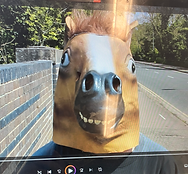
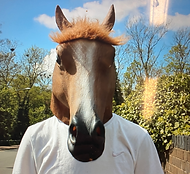
For the final scene I originally tried to use a different horse mask that I bought
from a costume shop however this horse mask did not fit with the music videos
theme at all as it is a more silly interpretation of a horse head instead of being
more true to life like the original mask which a family member gave me
(see right for comparison). I did not have the budget and time to find an exact
replica of this horse mask so I instead used this tutorial of how to clone yourself
on premiere pro to use the same mask and actor in the frames.
I used this same masking effect for the overhead shot where Horse Head is viewing the other happy teenagers at
McDonald's as I wanted to show the contrast between Horse Head's bluer tones and their pink and yellow tones. I used this effect by using the crop tool and tracing around Horse Head's head and then editing the colour grading separately.
To fade between the final scene and the black white background I wanted to use a fade transition but as premier pro doesn't have transitions available. I used this tutorial which I found really helpful.
Location issues
For the original filming of the final footage of the film, I originally filmed on a long road bridge, however we found that the business of the bridge was a major issue as we had to keep retaking shots due to people walking by. so when we reshot the images we shot in the car park above kelsey kerridge instead and I found this was much better for filming so in the end I was happy to reshoot when we came into issues with costuming.
Technological issues
Using a drone to film:
The process of learning to film with a drone was the most challenging area of production for me and although in the end I had to remove this element from my music videos due to time and economical constraints preventing me from getting a new drone that I could film with in time, I felt the process taught me a lot about overcoming challenges and problem solving.
Main challenges
1. Calibrating the drone
Every drone has a digital compass built into it. This is pretty much the same thing as a
hand-held compass that you probably know already, only this one is a small chip that
is part of the drone’s electronics. Drones rely heavily on this compass sensor to help the
drone fly and keep it stable in the air by itself. I however did not know about this
necessary process when I first got my drone so the first 2 attempts to get it in the air
were unsuccessful. I only found out about this process when I contacted my friend
who enjoys flying drones and he explained this to me. Each drone manufacturer has a different way of calibrating the drone so in order to find out how to calibrate my drone I had to find the specific process for the type of drone that I own. I used this PDF and followed the instructions and I was successful!
2. Legalities of filming
The U.K has a list of laws for when operating drones even if its just for recreational use. It was very important to me that my production obeyed these rules so I planned to only film in public places such as parks and green spaces. For example image shows us doing some test filming with the drone in mill road cemetery where it is entirely legal to film.
3. The weather (wind and rain)
I checked the weather before filming with my drone however I did not realise how little wind would cause it to fall out of the air.
4. Saving the work to the SD card
The first time we filmed I didn't save my work to the SD card, I then bought another SD card because I thought that their might be an issue with the card however the same thing happened, I then tried to talk to the company through their website but they never replied.
5. Finding a solution
Due to not having the time or money to be able to get a new drone in time as the drone that I had
purchased was non refundable, I decided to remove the use of the drone from the music video and
use an extendable tripod for the above shots instead which actually worked really well and I liked
the stability of the shots that I filmed like this and the tripod kept the camera from moving.
Ongoing research
For the outro I wanted to show real life statistics in a memorable and intriguing way so that the audience would apply the emotional feelings from the video to real life and see that lots of people feel the same as them. The first statistic is about the main demographic of my video, UK students. I then wanted the next statistic to address the wider group of the global demographic of people struggling with mental health issues. Then I wanted the final statistic to be something that instals the idea of hope and the final message to be that the viewer isn’t alone. I then had to find the specific statistics, I looked online to find this information
I used this website (https://www.topuniversities.com/student-info/health-support/one-uk-student-dies-suicide-every-four-days-majority-are-male-why) to find the statistic about UK student suicide rates I think that it is a trusted source because the Guardian is a well known well trusted source and the statistics were only published 2 years ago.
I used this website for I think that it is a trusted source because it's a trusted website for careers advice, the article was recent and they reference they cite well known credible news companies such as the bbc in their references and they give links to the exact articles.
I used this website for I think that it is a trusted source because the article was posted very recently so it's current and also they have cited all their sources.
I used this website for I think that it is a trusted source because it's a trusted credible charity and when I researched further into the organisation, everything they claimed about themselves on their website was true.
I then made a rough storyboard for the ideas of what images I wanted to animate. This is the storyboard I drew….
I used this youtube video that someone else had animated of a piece of paper being crumpled so I could see the kind of shapes they drew to create a realistic animation. I watched the video slowly and paused it a lot so I could see all the different frames.
For the globe turning movement I did the same thing and found a video of a globe turning however I didn’t pause the video as much as after a couple watches I felt I had more of an idea of how to animate this as the rough movement it was just the countries that needed to move to one side and then disappearing. I found this a little tedious to animate but much easier than the crumpled paper. I wanted to use the penultimate sequence to show diversity and how so many different people struggle with mental health issues.
I then wanted to use the final sequence to tie back to the music video itself and hammer home the theme of the horse mask and how it links to humanity as a whole, I had some trouble with drawing the Horse Head so I started by using a reference image and I had to do a little extra practice but after a little while of trial and error I felt confident with the final image.
A big challenge I faced when editing the outro was fitting the final statistic over the head sequence I wanted the heads to be bigger however I didn't want the large amount of text to obstruct this. To solve this issue I created a third layer on krita of all black and reduced the opacity to 50% I then put this layer over where I wanted the statistic to begin and then I used the erase tool to write with, this meant that I could keep the heads as large and visible as well as keeping the text large and visible I then went over the less visible areas of text on the original layer with white pen on the second layer as I wanted to priorities the statistic being as readable. I screenshotted my screen though out the process to demonstrate the progression: